

Adobe just killed the most annoying part of AI video creation. No more regenerating entire clips when one detail looks wrong.
Firefly now lets you edit specific video elements with text prompts. Change sky colors. Adjust camera angles. Fix contrast. All without starting from scratch. Plus, Adobe added heavyweight third-party models like FLUX.2 and Topaz Astra to the platform.
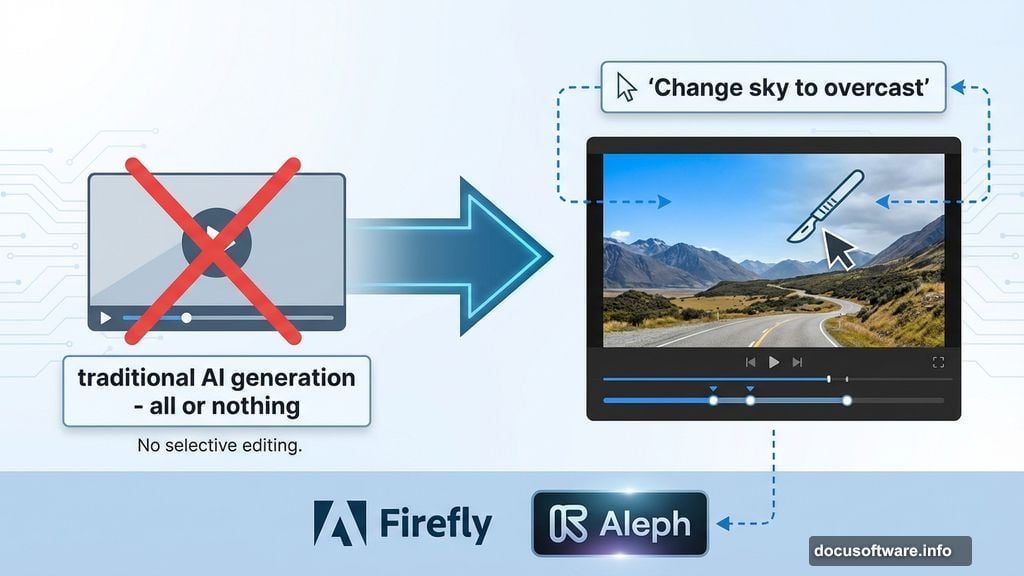
This matters because AI video tools have been frustratingly all-or-nothing. You generate a clip, spot one bad element, and have to roll the dice again. That workflow wastes time and credits. Adobe’s new editor fixes that fundamental problem.
Text Prompts Control Everything Now
The new video editor brings surgical precision to AI video work. Instead of hoping your next generation fixes issues, you just tell Firefly what needs changing.
Using Runway’s Aleph model, you can type instructions like “Change the sky to overcast and lower the contrast” or “Zoom in slightly on the main subject.” The AI adjusts just those elements while keeping everything else intact.
But Adobe’s own Firefly Video model takes this further. Upload a start frame and reference video showing the camera motion you want. Tell Firefly to recreate that camera angle for your working video. So you can match professional camera movements without regenerating clips dozens of times.
The timeline view adds even more control. Adjust individual frames. Fine-tune audio. Modify specific characteristics without touching the rest of your video. Think traditional video editing meets AI generation.
Timeline View Brings Back Manual Control
Adobe first showed this editor in October during private beta. Now it’s rolling out to all Firefly users.
The timeline interface looks familiar if you’ve used Premiere Pro or Final Cut. But instead of cutting clips, you’re editing AI-generated elements frame by frame. Drag sections around. Layer effects. Sync sound precisely.
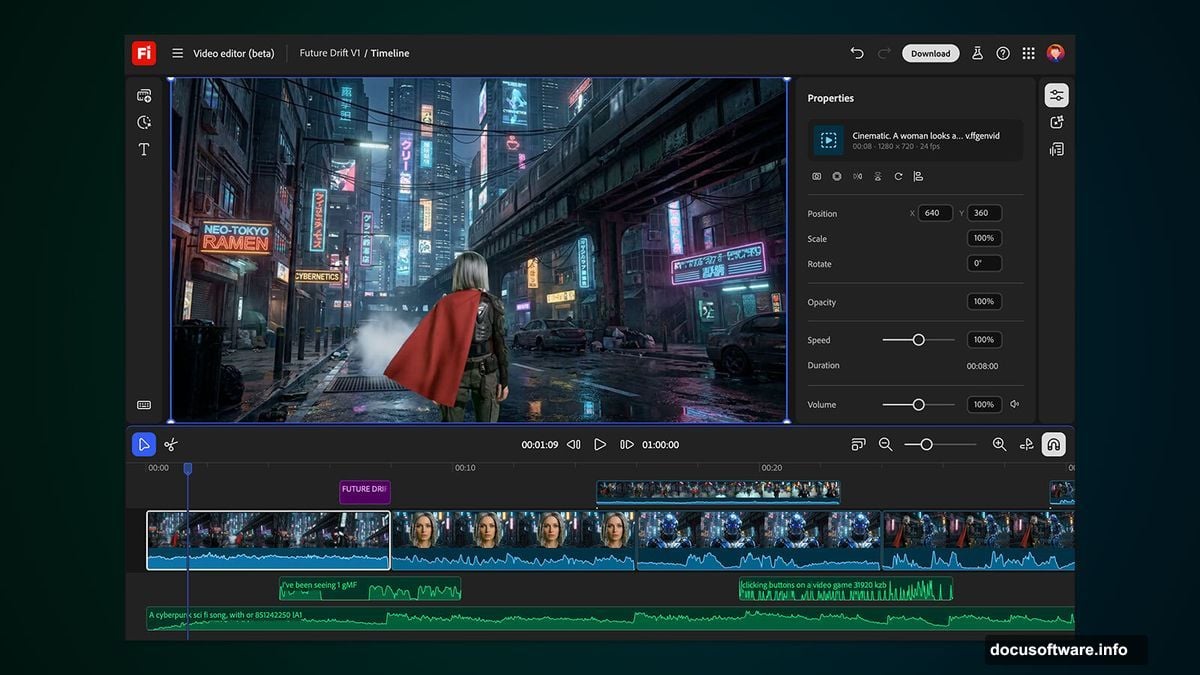
This hybrid approach matters. Pure AI generation feels like magic when it works. But you need manual controls when it doesn’t. The timeline view gives you both options in one tool.
Most AI video platforms force you to choose. Either accept what the AI generates or start over. Adobe lets you keep the good parts and fix the bad ones.
FLUX.2 and Topaz Join the Party
Adobe isn’t just improving its own models. They’re opening Firefly to serious third-party competition.
Black Forest Labs’ FLUX.2 image generation model arrives immediately across all Firefly platforms. Adobe Express users get access starting January. FLUX.2 earned respect for photorealistic outputs and detailed prompt following.
Topaz Labs’ Astra model handles upscaling. Take your AI-generated video to 1080p or 4K resolution. That matters for professional work where 720p doesn’t cut it.
Why add competing models? Adobe knows users will choose platforms with the best tools. Lock users into only Adobe models and they’ll jump ship when better options emerge. Give them everything in one place and they stay.
The collaborative boards feature sweetens the deal. Teams can work on projects together instead of passing files back and forth. That workflow improvement matters as much as model quality.
Unlimited Generations Through January
Adobe’s pushing hard to hook new users. Through January 15, several subscription tiers get unlimited generations from all image models and the Adobe Firefly Video Model.
That includes Firefly Pro, Firefly Premium, 7,000-credit, and 50,000-credit plans. Normally these plans meter generations carefully. Unlimited access lets you experiment without watching credit counts.

Smart timing too. Companies evaluate new tools during year-end planning. Give them unlimited access for a month and some will get hooked enough to keep paying after the trial period.
But here’s the catch. Unlimited access only applies to specific models in the Firefly app. Third-party models like Runway’s Aleph probably still count against credits. Read the fine print before going wild.
Adobe Firefly’s Wild 2025
This update caps a busy year for Firefly. Adobe launched subscription tiers in February. Then came the new web app and mobile apps. Now they’re adding third-party models and advanced editing tools.
The strategy makes sense. AI video generation exploded in 2025. Runway, Pika, and Stability AI all pushed major updates. OpenAI’s Sora looms on the horizon. Adobe needs to move fast or get left behind.
Their advantage? Integration with Creative Cloud. Professionals already use Premiere Pro, After Effects, and Photoshop. If Firefly plugs seamlessly into that workflow, it wins even if competitors have technically better models.
Plus Adobe owns the corporate accounts. Enterprise customers don’t switch tools easily. Build Firefly into existing contracts and companies will use it by default.
Who This Actually Helps
Video creators tired of generation roulette win big here. YouTubers can fix thumbnails without regenerating. Marketers can adjust brand colors precisely. Filmmakers can match camera movements frame by frame.
The editor particularly helps iterative work. Brainstorm concepts by generating rough clips. Then refine details with text prompts instead of starting over. That workflow cuts production time dramatically.
But casual users might not care. If you’re making quick social media clips, full regeneration works fine. The advanced editing tools shine for professional projects where details matter.
Enterprise teams benefit most from collaborative boards. Share projects. Leave feedback. Iterate together. That beats emailing video files and hoping everyone sees the latest version.
Adobe’s betting professionals will pay premium prices for these advanced features. Meanwhile free tools capture casual users. The market’s splitting into serious tools for pros and simple apps for everyone else.
The Competition Isn’t Sleeping
Don’t expect Adobe to dominate AI video unchallenged. Runway keeps pushing boundaries with new models. Pika Labs focuses on ease of use. Stability AI offers open-source alternatives.
Plus the big tech players circle. Google’s Veo 2 just dropped. OpenAI’s Sora waits in the wings. Meta experiments with video generation. These companies have resources Adobe can’t match.
Adobe’s moat depends on workflow integration and enterprise relationships. As long as professionals rely on Creative Cloud, Firefly has a captive audience. But if competitors nail the enterprise integration first, that advantage evaporates.
The third-party model strategy helps hedge bets. If FLUX.3 or Runway’s next model crushes Adobe’s internal development, Firefly users still get access. That keeps the platform competitive even when Adobe’s own models lag.
Smart defensive move. But it also admits Adobe can’t win on model quality alone. They’re building a platform play instead of a model play.
Prompt-based editing changes the AI video game fundamentally. No more generation roulette. No more wasting credits on almost-right clips. Just tell the AI what needs fixing and move on.
Whether Adobe can maintain this lead depends on execution. Roll out features smoothly and they capture market share. Ship buggy updates and frustrated users flee to competitors.
But the direction looks right. AI video tools needed better editing controls. Adobe delivered exactly that.