
Adobe just showed off something most creative professionals have been secretly hoping for. Not another AI that generates pretty pictures. Instead, they built assistants that actually understand the entire messy process of creating content.
Here’s what makes this different. These AI helpers live inside the apps you already use. They remember what you’re working on. And they handle the tedious tasks that pull you away from actual creative work.
Let’s break down what Adobe’s betting on and why it might actually matter.
Conversational AI That Gets Context
Most AI tools today work like this: you type a prompt, get a result, then start over. Adobe’s building something smarter.
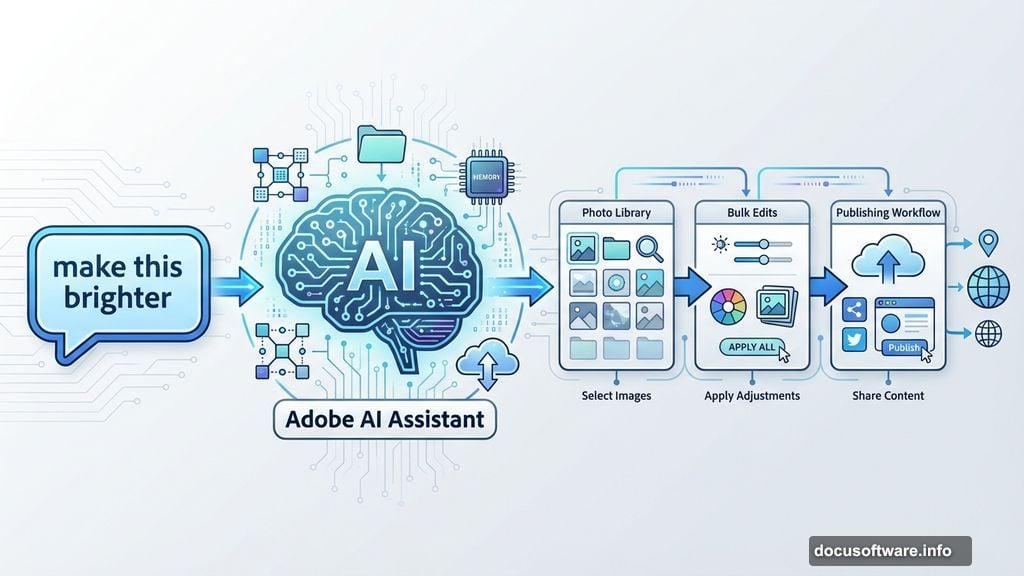
Their AI assistants carry context between tasks. You can start a conversation about organizing your photo library. Then ask it to apply edits in bulk. Then request help publishing finished assets. The assistant remembers everything you discussed.
That context awareness changes the game. Instead of treating each request separately, the AI understands your broader goals. So when you ask it to “make this brighter,” it knows which image you mean and what style you’re going for.
Plus, these assistants learn from your choices. Share your preferences, and they adapt to your workflow. The more you work together, the better they get at anticipating your needs.
Three Ways Adobe’s Bringing This to Life
Adobe announced several tools that show where conversational AI is headed. Each one tackles a different part of the creative process.
AI Assistant in Adobe Express launched in public beta today. This one helps everyone create polished content by describing what they want in plain language.
The clever part? You can iterate on any element without starting over. Change the background. Adjust one layer. Tweak the colors. The parts you like stay intact while the assistant modifies what you specify.
That addresses a huge frustration with most AI tools. Usually, asking for changes means regenerating everything and hoping the good stuff survives. Adobe’s approach preserves your progress.
AI Assistant in Photoshop entered private beta for the web version. This one lets professionals chat directly inside Photoshop to tackle complex workflows.
You can bounce between conversation and manual tools seamlessly. Ask the assistant to handle repetitive tasks. Then grab precise control when details matter. It’s designed for that hybrid working style most creators actually use.
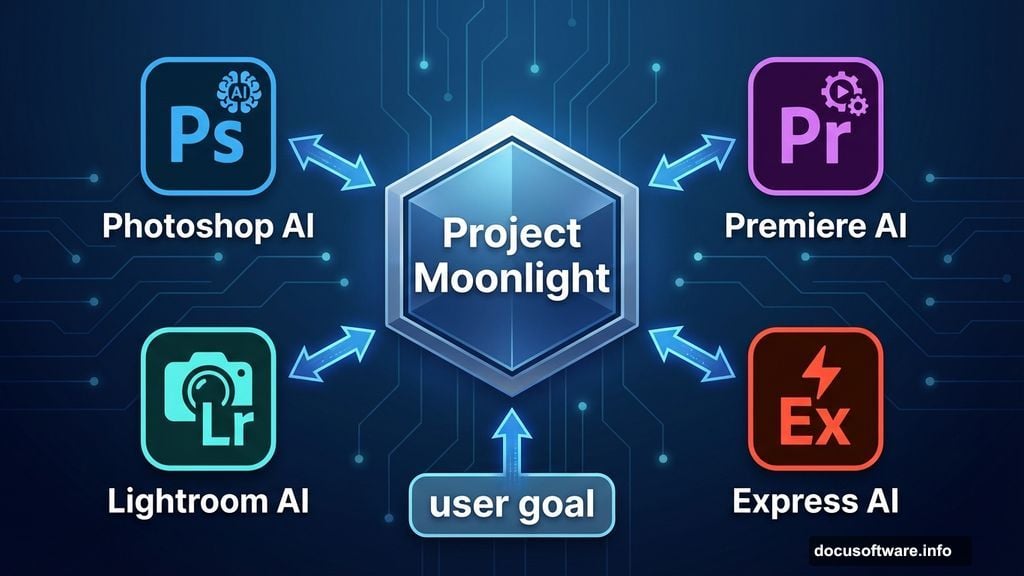
Project Moonlight takes the biggest swing. Think of it as a conductor that coordinates all of Adobe’s individual AI assistants.
Each app has its own specialized assistant. Photoshop for images. Premiere for video. Lightroom for photos. Project Moonlight orchestrates them together based on what you’re trying to accomplish.
Tell it your goal, and it figures out which assistants to involve and how they should collaborate. The result feels like working with a team that already knows your style and preferences.
What Project Moonlight Actually Does
Adobe’s focusing Project Moonlight on the earliest creative stages first. That’s where creators said they want AI help most.
Here’s what it handles now in private beta:
Context-aware intelligence that connects to your Creative Cloud libraries and social accounts. It analyzes your existing work to understand your style. Then it suggests ideas and content that match your aesthetic.
Conversational creation that turns discussions into actual content. As you chat about ideas, Project Moonlight generates images, videos, and social posts aligned with your direction. You move from concept to execution without switching contexts.
Data-driven strategy by linking your social channels. The assistant analyzes performance, spots trends, and recommends content strategies. It helps you understand what’s working and why.
Adobe’s starting with ideation and creation because that’s where the technology makes sense today. More capabilities will roll out as they expand across their creative ecosystem.
They’re also asking creators to join the beta and help shape where Project Moonlight goes next. Your feedback directly influences what features get built.
Beyond Adobe’s Ecosystem
Creativity doesn’t stay in one app. Adobe knows this. So they’re also building bridges to popular chatbot platforms.
Imagine designing a flyer for an event by chatting with your preferred AI assistant. You describe what you need. The assistant connects to your Adobe Express account and creates initial designs. You refine through conversation. Then jump into Express for final touches and schedule posts across social channels.
This approach removes friction from moving between tools. Start where you naturally work. Pull in Adobe’s creative capabilities when needed. Finish wherever makes sense for your workflow.
It’s early days for this integration. But it signals Adobe’s thinking beyond just their own apps to meet creators wherever they already spend time.
Why This Approach Feels Different
Most AI tools today handle individual tasks. Generate this image. Edit that video. Write this caption. Then you’re on your own to connect everything together.
Adobe’s betting that the real value comes from assistants that understand entire workflows. Not just “make this photo brighter” but “prepare these 50 photos for my client presentation” followed by “now generate social posts featuring the best shots.”
That requires different technology. The AI needs to maintain context across multiple requests. Remember your preferences. Coordinate between specialized tools. And know when to step back so you can take direct control.
It’s technically harder to build. But it matches how people actually create content. You rarely do just one isolated task. You’re managing projects with dozens of connected steps.
The Hybrid Working Style
One detail stood out in Adobe’s announcements. They keep emphasizing seamless switching between conversation and manual control.
That matters because pure conversational interfaces have limits. Sometimes describing what you want takes longer than just doing it yourself. Sometimes you need pixel-perfect precision that’s hard to convey through words.
Adobe’s designing for both modes. Chat with the assistant when that’s faster. Grab the tools when you need hands-on control. The interface doesn’t force you into one approach.
This flexibility addresses a common complaint about AI creative tools. Many feel like black boxes where you either accept what the AI generates or start completely over. Adobe’s building something that lets you guide and refine throughout the process.
What Actually Matters Here
Strip away the technology buzzwords and Adobe’s making a specific bet. They think the future of creative software combines natural conversation with precise manual control.
Not replacing human creativity. Not automating everything. Instead, building assistants that handle tedious work so you can focus on decisions that require taste and judgment.
The proof will be whether creators find these tools genuinely useful or just clever demos. Adobe’s inviting beta testers to help answer that question.
Early signs suggest they’re onto something. Focusing on entire workflows rather than isolated tasks aligns with how creative professionals actually work. And designing for hybrid interaction acknowledges that conversation isn’t always the right interface.
These AI assistants probably won’t revolutionize creativity overnight. But they might make the boring parts of content creation less painful. And that’s a problem worth solving.